Shopify Functions in practice: how to translate business requirements into effective technical logic in the checkout
Shopify Functions is a relatively new Shopify platform mechanism that allows developers to modify a store's backend logic. They enable customizing Shopify's default behaviors to meet specific business needs, especially in the checkout process. In the following article, I explain what Shopify Functions are, what possibilities they offer, when it's worth (or not worth) using them, and how to approach designing a solution based on Shopify Functions to effectively translate business requirements into working technical logic.

What are Shopify Functions?
Shopify Functions are small, efficient programs run on the Shopify server-side, directly within the platform's infrastructure. They allow you to "inject" your own code at specific points in the purchasing process, modifying the store's default behavior. In other words, they are extensions that allow for customizing the business logic of Shopify to unique requirements that cannot be met with standard settings.
These functions are the successors to older Shopify Scripts (written in Ruby and available only for Shopify Plus), which Shopify is gradually phasing out – support for Shopify Scripts will end in June 2026. In contrast, Shopify Functions are faster, more stable and easier to distribute, because they run in a secure WebAssembly environment on Shopify's servers, and merchants use them through apps (they don't have to manually edit code as in the Script Editor).
Technically speaking, a Shopify Function is a piece of code (usually written in high-level languages like JavaScript/TypeScript or Rust, then compiled to WebAssembly) that runs in response to an event during checkout. Each function defines a GraphQL query (the so-called input query) specifying what data from the Shopify store it will receive as input – e.g., cart contents, product data, customer information, etc. – ensuring that only the necessary subset of data reaches the function. Based on this data, our code executes the programmed logic (e.g., calculates a discount, decides to hide a given payment method) and returns the result as instructions (operations) to be executed by Shopify, also defined by a GraphQL schema (the so-called mutation output). Shopify reads the result and modifies the checkout process accordingly – for example, by applying a discount to the cart or hiding a specific delivery option.
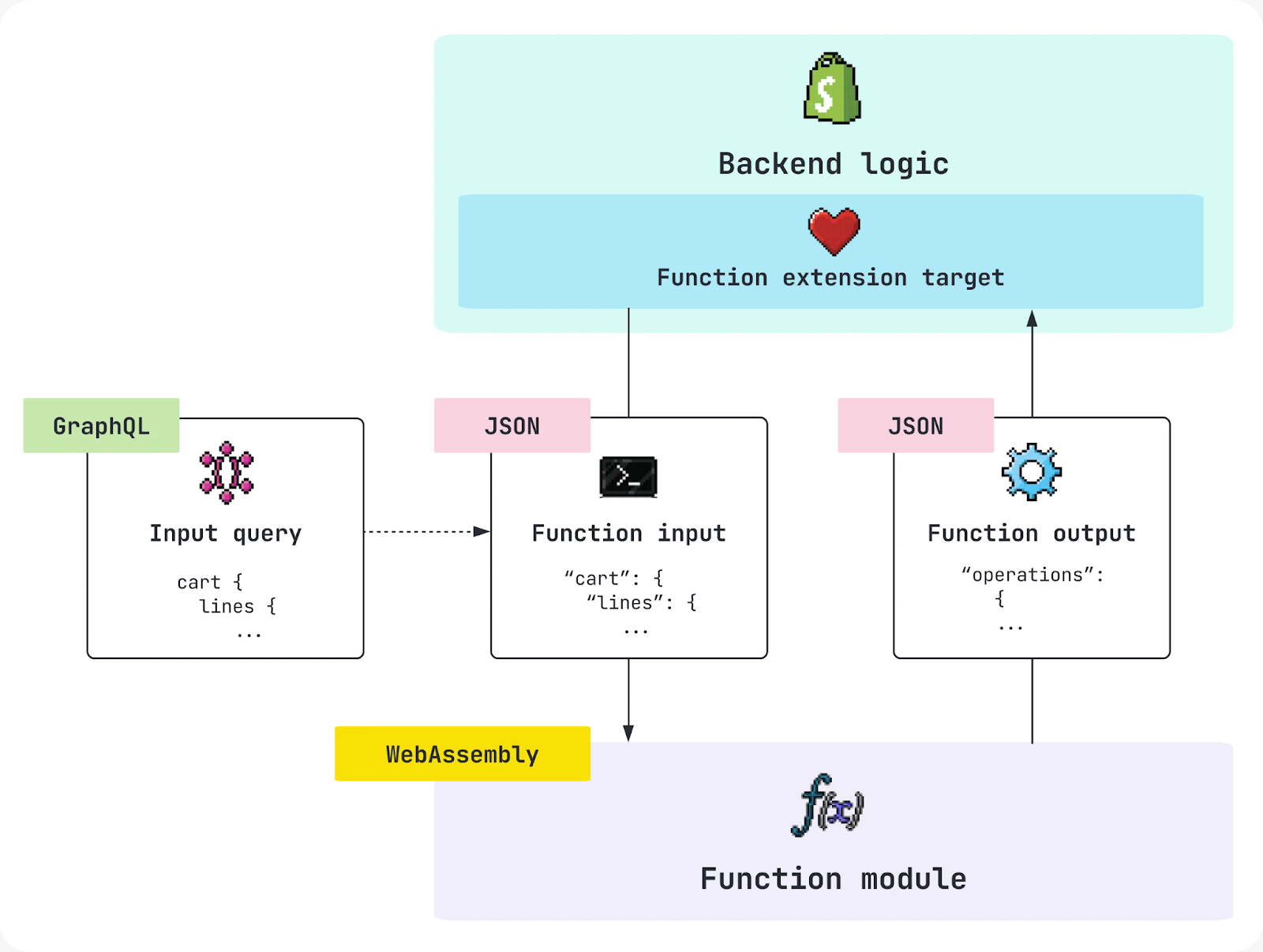
Several key characteristics of Shopify Functions worth highlighting:
- Backend operation: Functions operate under the hood – on Shopify's server-side, not in the user's browser. A customer visiting the store doesn't directly see that a "function" has been executed; they only see the effect of its operation, such as an automatically applied discount or a hidden payment method.
- Platform integration: Each function is delivered as an app or as part of an app. Once the app is installed, the function's code is embedded at the appropriate point in the store's logic. Shopify itself handles calling the functions at the right moment in the purchasing process (the developer doesn't need to create their own webhooks or endpointsto trigger the code – the platform does it for them).
- Security and isolation: Function code runs in an isolated WebAssembly environment. This has two consequences: first, performance – Shopify states that function code executes in under 5 milliseconds, ensuring that even during major promotional events (like Black Friday), additional logic won't slow down the store's operation. Secondly, access limitations – functions only have access to the data defined in the GraphQL query (and possibly some store configuration resources like metafields). By default, functions do not communicate with external services or APIs during their execution, which guarantees speed (although a mechanism called "fetch targets" is emerging, allowing data retrieval from external sources – currently limited to custom apps on Shopify Plus).
Where are Shopify Functions used?
Shopify Functions were primarily designed for customizing key stages of the purchase process. Currently, they allow for advanced modifications in several checkout areas:
1. Delivery Customization
This function enables dynamic changes to the available delivery options visible to the customer during checkout. For example, we can change delivery method names, hide certain options, or reorder them in the list.
Example use case: a store might offer a default "Local Delivery" option but want to rename it for customers in a specific city – e.g., "Bicycle Courier (Local)." A Delivery Customization Shopify Function can detect if the delivery postcode belongs to that city and modify the delivery method's name or completely hide/show an additional delivery option for selected regions.
2. Automatic Discounts and Promotions (Discount Functions)
This is a very extensive area – Shopify Functions allow you to create new types of promotional rules that go beyond the capabilities of standard discount codes or Shopify's automatic discounts. We have several types of discount functions available, including:
- Order Discount (discount on the entire order) – e.g., an automatic 10% discount on the entire order if the customer adds at least 2 products made from eco-friendly materials (e.g., bamboo, recycled stainless steel, organic cotton) to their cart.
- Product Discount (discount on a specific product/item) – e.g., a "20% off the cheapest product in the cart" promotion or BOGO (buy one get one free).
- Shipping Discount (discount on shipping) – e.g., free shipping for purchases over 250 PLN, but only for a specific product group.
Example use case: a clothing store wants to offer free delivery for orders where all products are from a specific category (e.g., "Accessories") and the cart value exceeds 250 PLN. Standard Shopify rules do not allow assigning free delivery based on such a complex condition (a combination of product categories and order value), but this can be implemented using a Shipping Discount function. Another example could be the previously mentioned "20% off the cheapest product in the cart" promotion – this type of discount requires analyzing all items in the cart and selecting the one with the lowest price, which is ideally suited for implementation via a Product Discount Function.
3. Payment Customization
These functions are used for controlling available payment methods at checkout. For example, they allow you to hide selected payment methods in specific situations or change their display order.
Example use case: a store wants to promote a local payment gateway (e.g., Przelewy24) for customers from Poland, displaying it first in the list of payment methods. A Payment Customization Function can dynamically set the order of methods based on the customer's country. Another use case could be hiding the Cash on Delivery (COD) optionif the customer chose delivery to a parcel locker or personal pickup point – a scenario impossible to set up in the Shopify admin panel itself, but achievable with a function. (It's worth noting, however, that certain methods cannot be moved above methods natively preferred by Shopify – for example, Shop Pay will always be promoted at the top of the list, so a function can at most manage other methods below it).
4. Cart Transform
This type of function allows for programmatic modification of cart items before the customer finalizes the order. The most common use case is bundles, i.e., product packages. With the Cart Transform API, for example, after adding a specific combination of products to the cart, they can be automatically transformed into a single "virtual" product bundle. You can change the prices of items in the cart, their titles, or combine/split items.
Example use case: a sports store wants to sell a "Sports Outfit" set consisting of a t-shirt, shorts, and socks for a fixed price of 299 PLN. The customer can add these items separately to the cart, and the Cart Transform function will detect the appropriate set and transform three items into a single bundled item (e.g., by changing their name to "Sports Outfit - 3-in-1 Set" and setting the price at 299 PLN for the whole). This way, in the order summary, the customer sees one product (the set) instead of separate items, simplifying the shopping experience.
5. Cart and Checkout Validation
Validations allow for blocking order finalization if it does not meet specific business conditions. A validation function can throw an error (preventing progression to payment) along with a message for the customer if, for example, a required item is missing from the cart or a forbidden combination exists.
Example use case: An alcohol-selling store may require the buyer to confirm their age. If the customer does not check the appropriate box (e.g., a metafield in the customer profile or a custom field in the checkout integrated with the app), the validation function can block order finalization and display a message such as "You must be 18 years or older to purchase this product." Another example of validation could be limiting the maximum number of units of a given product per order – if a customer tries to buy more than the allowed limit (e.g., 5 units), the function can prevent checkout and ask them to reduce the number of items.
As you can see, Shopify Functions cover key aspects of the offering during checkout: prices and discounts, shipping, payment, and order validation rules. In each of these areas, we can implement unique business logic that would not normally be available in the store's settings.
Key benefits of Shopify Functions
Why should you even consider Shopify Functions? Here are the most important advantages of this solution from the perspective of performance, management, and flexibility:
- Blazing-fast performance: Functions run within the Shopify environment, which means no delays associated with external communication. Shopify states that function code executes in <5 ms, meaning that even with high traffic (flash sales, Black Friday) adding custom logic does not noticeably affect cart processing time. This is a huge improvement over older solutions (e.g., Shopify Scripts), which operated slower and could slow down the checkout process with more complex calculations.
- Scalability and reliability: Since everything runs on Shopify's servers (as part of the so-called commerce logic backend), functions automatically scale with the load. We don't have to worry about the performance of our own server or instance - Shopify ensures that functions have the necessary resources. Additionally, function code is executed in an isolated environment, with imposed time and memory limits, which prevents situations of freezing or overloading (if a function is too slow, Shopify will simply terminate it to avoid blocking the purchase process).
- No need to maintain your own infrastructure: Unlike traditional applications (where we often have to create and maintain a server, database, API, etc.), Shopify Functions do not require the developer to set up any server backend. All logic is deployed within the Shopify application (hosted by Shopify). This simplifies the solution's architecture and eliminates many potential points of failure (lack of connection, network errors, etc.).
- Ease of use for merchants: Although Shopify Functions are written by developers, their effects are often manageable directly within the store's admin panel by non-technical users. For example, if an app introduces a new type of discount, the merchant can create and configure promotions using this function within the familiar Shopify interface (Discounts section) - without needing to edit code or have programming knowledge. Similarly, shipping or payment functions can offer simple settings or toggles in the admin panel, allowing the merchant to decide when specific logic is active. This is a significant advantage - the developer prepares the tool, and the business can use and fine-tune it independently.
- Personalization and competitive advantage: The ability to implement any business logic (within the limits provided by the Shopify Functions API) opens the door to standing out from the competition. Functions allow you to address very specific needs - something other stores relying solely on native features don't have. Whether it's a complex loyalty program with custom discounts or advanced order fulfillment rules - functions provide the tools to achieve this and thus offer customers a unique shopping experience.
Limitations and important considerations
Of course, Shopify Functions are not a "silver bullet" - they have certain limitations that are worth remembering when planning a solution:
- Limited scope of operation: functions only operate at specific points in the purchase process (the areas mentioned earlier). They are not a universal mechanism for changing everything in the store. If something happens outside of checkout (e.g., on a product page, in the storefront cart, in the admin panel, or in fulfillment processes after an order is placed), then Shopify Functions will not be able to interfere there. Their "world" is the order completion process - from the moment products are added to the cart until payment is finalized.
- No impact on the user interface: functions operate on logic and data, not on appearance. They cannot be used to change the layout of elements on the checkout page or add new fields/forms (other mechanisms, such as Checkout UI Extensions, discussed later, serve this purpose). Shopify Functions decide what happens (e.g., "hide method X", "apply discount Y"), but how it is presented to the user remains at the discretion of the Shopify platform and any front-end extensions.
- One function per area rule (in the context of discounts): In the case of discount functions, it's important to remember that Shopify does not allow multiple automatic promotions to be applied simultaneously from different sources. If we install two different apps with discount functions (or even create two separate discount extensions for different types of discounts within one app), then ultimately only one discount will be applied automatically. Shopify will choose the most beneficial one or one function by default - in other words, promotions from different functions do not "stack" by default. While there is a mechanism for discount combinations (Discount Combinations) that allows combining specific offers, it requires conscious configuration on the store's side and adherence to stacking rules. Therefore, a good design practice is to handle all necessary promotion rules within a single function/extension, which can potentially return multiple discount applications simultaneously. This way, we avoid conflicts where two different functions "compete" over which one applies its discount. (A similar principle applies to other areas - for example, if two functions try to modify the list of payment methods, the outcome can be unpredictable, so it's better to have one function managing all payment logic).
- Data access and lack of persistence: functions operate statelessly - each time Shopify invokes them, they receive a data snapshot (defined in a GraphQL query). They do not have access to any database beyond what we pass to them. They do not "remember" anything from previous invocations (unless we save something, e.g., in metafields via a separate mutation, but that's already a workaround). Nor can they permanently modify store data beyond what their output dictates (e.g., they won't change a product's fixed price in the catalog - they can only affect the price in the cart). This means they are not suitable for logic requiring state, history, or multi-step integrations (a standard application with its own database would be better here).
- Short execution time and no external connections: as mentioned, functions must operate quickly. By default, they cannot make network calls (e.g., to an ERP or CRM API) during their execution - this ensures we don't wait for a response and checkout is smooth. However, for this reason, we cannot, for example, implement real-time customer credit checks on an external service within a function - such things must be handled differently (outside the checkout flow). Shopify is introducing an experimental capability for limited data retrieval from external APIs within functions (so-called fetch targets), but this only works in custom apps on Plus plans and requires additional permissions - typically, when building functions, we assume no external connections.
In summary: Shopify Functions offer powerful capabilities, but within a strictly defined scope. They should be treated as specialized tools for modifying checkout logic, not a general "solve-all" solution for every store problem.
Shopify Plan Requirements (Who Can Use Functions?)
With the introduction of Shopify Functions, questions arose about the availability of this technology on different Shopify plans. The situation is as follows:
- Any Shopify plan (in the context of using ready-made apps): If you use public apps available in the Shopify App Store, which have built-in Shopify Functions, then you can use them on any plan - from Basic, through Shopify, Advanced, to Plus. In other words, functions provided by Shopify partners in the form of apps are available to all stores, regardless of the plan. This is great news for smaller stores - even though advanced checkout modifications were previously the domain of Shopify Plus only (e.g., Shopify Scripts), now even a store on a basic plan can benefit from similar capabilities by installing the appropriate app.
- Custom functions - Shopify Plus only: If you need to create your own dedicated app with a function (i.e., a custom app, written solely for your store or client, not published in the App Store), then unfortunately you must have a Shopify Plus. Shopify strictly limits the ability to run custom code in checkout - only Plus stores can install custom apps containing functions. From a business perspective, this means that flexibility and custom solutions require the highest plan. Stores on lower plans are limited to publicly available solutions - which usually covers most standard needs, but very specific requirements may necessitate upgrading to Plus (or finding a purely front-end workaround).
- Special functions for Plus only: Furthermore, some specific Shopify Function APIs are exclusively available to Plus stores (and often as a custom app). Examples include functions that generate additional shipping options such as Pickup Point (pickup point) or advanced order routing rules to specific warehouse locations. Shopify provides these in early access mode only for Plus plans, as they typically concern larger merchants with extensive logistics. So, if your store needs, for example, its own integration with parcel lockers presented directly in checkout (i.e., generating a list of pickup points based on an external carrier API) - this will also require Shopify Plus.
In practice, most standard functions (discounts, shipping, payments, validations) are available to everyone through public apps. Shopify Plus, however, unlocks the full potential - creating your own functions from scratch and using the most advanced (often custom or still in beta) checkout extensions.
Shopify Functions vs. Apps - Logic and Management
Every Shopify Function exists within the context of an application (app). It's worth understanding how this works from an architectural and management perspective:
- Function as an app extension: Within a single Shopify app, you can define multiple functions (e.g., one for discounts, another for payments, etc.), while each of them is a separate extension. Such an application has a configuration file (shopify.extension.toml) defining the extensions, as well as separate code folders for each function. For a developer, this is clear – when creating an app, we generate scaffolding for a given function type and write code independently for each extension.
- No graphical interface in checkout (UI): It's worth noting that Shopify Functions do not add new interface elements themselves. This is purely backend logic. If our application is a "discount" type, its effect will appear, for example, as a different price calculation in the cart or an additional discount label, but no new button or field will appear in the checkout interface just because we have a function. The checkout interface can be modified separately using so-called Checkout UI Extensions (more on that in a moment). However, an application with functions can have its own administration panel (the "app UI" in Shopify Admin), written, for example, in the Remix or Polaris framework – and there, the developer can provide settings for the merchant or buttons to manually trigger certain actions. For instance, a discount app might have a list of promotion rules in its panel that the merchant can enable/disable. However, this is already part of the standard app frontend embedded in Shopify Admin – do not confuse this with the store interface that the customer sees.
- Managing and deploying changes: After installing an application with a function, the merchant typically configures its operation via:
- App admin panel: here, app creators can expose various configuration options. For example, a validation app might have a field for entering a message displayed to the customer when a rule is violated, toggles for activating/deactivating a given rule, etc.
- Integration with the native Shopify panel: some functions integrate directly. Discounts are an example – after installing a discount app, the merchant can create offers in the Discounts panel in Shopify admin, where a new discount type appears (provided by the app). By creating such a discount, they are de facto configuring an instance of the function's operation (passing parameters to the function via GraphQL). As a result, the store owner feels as if they are using a native Shopify feature, even though our custom code is running "underneath."
- App admin panel: here, app creators can expose various configuration options. For example, a validation app might have a field for entering a message displayed to the customer when a rule is violated, toggles for activating/deactivating a given rule, etc.
- Updating function behavior: If, after deployment, there's a need to change the logic, the developer updates the function code and redeploys the application (e.g., using Shopify CLI). Shopify will automatically start using the new code version. Configurations set by the merchant usually remain in effect (unless the GraphQL input/output schema changes – in which case migrations are needed).
- Coexistence of multiple functions: This topic has been touched upon before, but it's worth repeating – if you're planning an application with multiple functions (e.g., several different promotions), remember that within a single Shopify "target," only one extension will run. In practice, this means that for one area (e.g., discounts), only one function can be active per store at a time. If you install two different discount apps, Shopify will still only use one when calculating the cart discount (most often the one that offers the largest discount or according to an internal order). Similarly, for cart validation – Shopify runs only one validation function, so all conditions should be checked within a single function, not several separate ones. This is important for design: instead of creating many small apps, consider grouping the logic into one if they are meant to operate in parallel. (Fortunately, this issue does not apply, for example, when you have a discount function and a delivery function – these are in different areas, and Shopify will run both at the appropriate times).
Lifecycle of an application using Shopify Functions
From the perspective of the full deployment process, an application with Shopify Functions goes through the following stages:
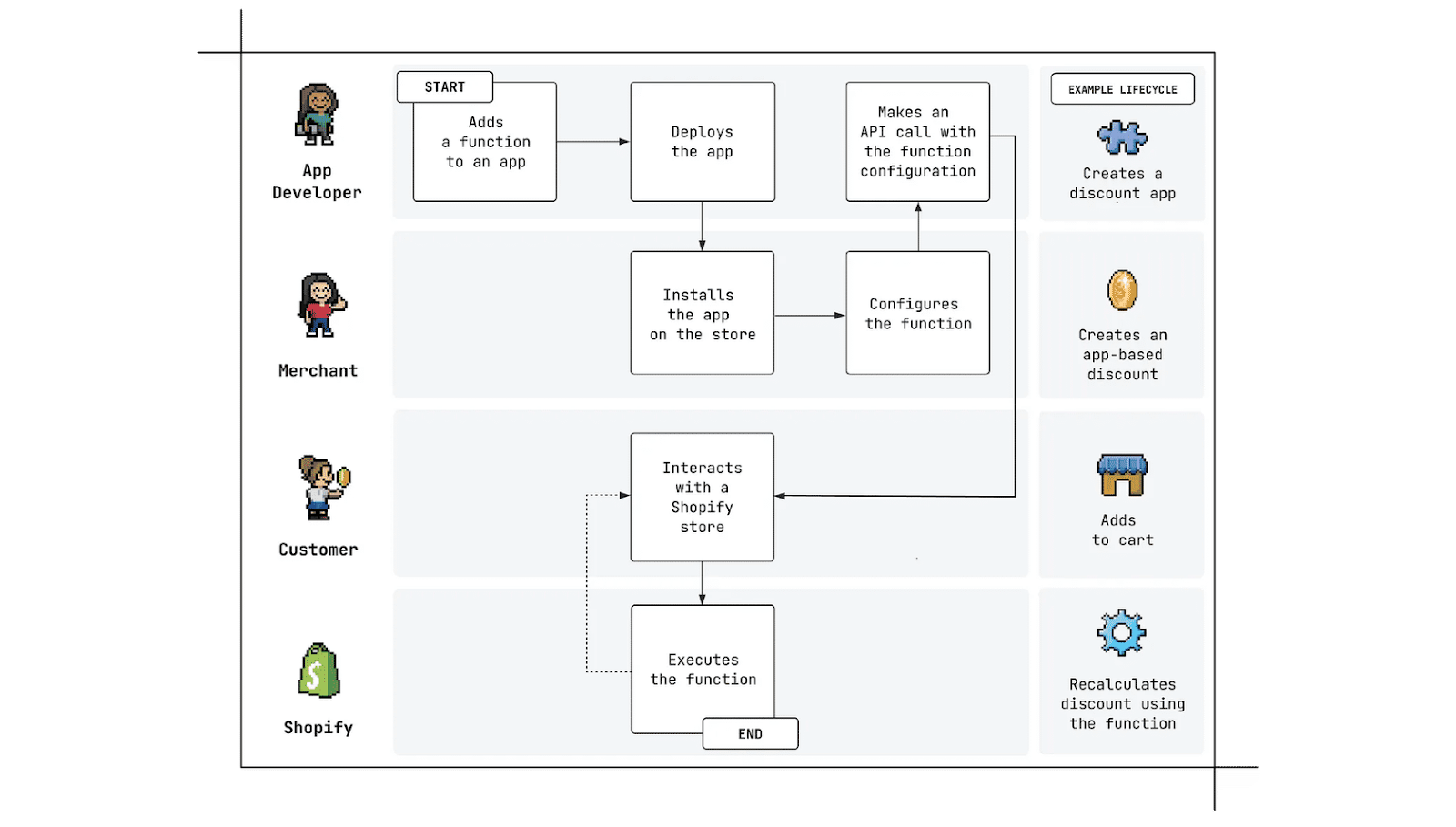
- Creation and deployment (development & deployment): A developer or team (e.g., a Shopify agency) creates an application containing one or many functions. They write code, test it on a development store, and then deploy the application. Deployment can mean publishing it in the Shopify App Store (if it's a public app) or installing it on a specific store (if it's a private/custom app created for a client). In our case (the company attomy), this will often be a direct deployment to the client's store as a custom application.
- Installation and configuration (merchant onboarding): The store owner (merchant) installs the application on their Shopify store and performs the necessary configuration. This might involve accepting requested permissions and then going through the app's settings. If the app offers, for example, discount functions, at this stage the merchant creates discount rules (e.g., defines: "10% discount on collection X for purchases over 200 PLN") using the interface provided by the app. This configuration typically results in a GraphQL mutation call to Shopify, which registers our function with the appropriate parameters (e.g., remembering the 200 PLN threshold and collection X as conditions for the discount to apply).
- Customer interaction and function execution (runtime): Once everything is ready, the store customer comes into play. While browsing offers, adding products to the cart, and finalizing a purchase, Shopify automatically runs the installed functions at appropriate times. For example, if a customer proceeds to checkout and enters an address, the system will at that moment call the Delivery Customization function (to potentially modify delivery options based on the address). Then, before displaying the price summary, discount functions will be run (to calculate promotions). Finally, before showing payment methods – payment functions, and so on. The customer does not perceive the operation of these functions in any way, except that the store's behavior is different, personalized. For instance, they might immediately see a discount applied to a product or not see the "Cash on Delivery" method if it shouldn't be available. All of this happens seamlessly as subsequent checkout steps load (no separate page reloads or waiting – functions execute in fractions of a second in the background).
It's worth noting here that Shopify Functions are not triggered by any external triggers like URLs or webhooks – the Shopify platform itself decides when and which function to run depending on the context. Our task as developers is merely to correctly register the function (by installing the app and potentially creating, for example, a discount rule via the merchant). The Shopify engine handles the rest.
To summarize this cycle: the developer provides the solution, the merchant activates and configures it, the end customer uses the e-store and experiences the effects of the function's operation, without even knowing about the entire mechanism.
When are native functions sufficient, and when are Shopify Functions needed?
Before reaching for Shopify Functions (or commissioning their development), it's worth asking: can this really not be done more simply? Many business requirements can be met using existing platform features or ready-made applications, without the need for custom code. On the other hand, some ideas by definition go beyond what the standard offers, and that's when functions will be a lifesaver. Here's how to recognize both situations:
Natively manageable requirements are those that:
- Are typical and foreseen by Shopify – e.g., a simple percentage discount on the entire order, free shipping above a certain amount, basic domestic/international shipping options, restricting the sale of digital products, etc. Shopify's admin panel has a range of built-in settings (discount codes, automatic discounts, conditional shipping rates, product types requiring terms acceptance, etc.) that often cover basic scenarios. If your business case can be "configured" in the Shopify admin, then there's absolutely no point in writing a function – it's a waste of time and money.
- Can be fulfilled by an existing App Store application – before you start building something from scratch, check the Shopify App Store. There's a good chance someone has already created an app that solves the problem. For example, do you want to add a pop-up upsell in checkout? Instead of writing your own extension (which would be difficult anyway, as functions don't touch the UI), you can use a publicly available Checkout Promotions app. Or do you need a simple validation like "limit 1 unit of product X per order"? – there are apps that do this. Of course, ready-made apps have their limitations and often work "generically" (they might not account for your specific business needs), but if they fit 80-90%, it's worth considering using them instead of investing in custom development.
Requirements justifying the use of Shopify Functions on the other hand, are those that meet one or more of the following criteria:
- No native option in the panel: The simplest test – can it be set up in Shopify without coding? If the Shopify admin panel does not offer a given functionality, that's a sign that we might need custom logic. For example, "hide payment method X when delivery Y is selected" – there's no such checkbox in the settings, so custom code is the only option. Similarly, "give a 5% discount to customers who have already made 3 purchases" – Shopify doesn't have a native option for segmenting discounts by the number of previous customer orders. Lack of native support is the primary reason to consider Functions.
- Complex logical rules / multi-stage conditions: If the requirement involves a unique algorithm or calculations that cannot be configured using ready-made components, it's likely a case for Shopify Functions. For example: dynamic discount calculation depending on the cart structure (e.g., "if the cart contains at least one product A and two products B or if the sum of category C > 500 PLN, then...") – such combinations of conditions are clearly a job for code. Another symptom is time-dependent or state-dependent logic, e.g., a promotion changes over time (something for the first purchase, something different for the second) – standard tools are static, while Functions can implement their own counter or sequence (provided we have a place to store state data, e.g., in customer metafields).
- Requirements based on custom or external data: If the logic needs to use data that are not a standard part of the checkout process – e.g., product/customer metafields, information from an external loyalty system, user preferences stored elsewhere – then custom code is essential. Shopify Functions can retrieve metafields (they are available in GraphQL input) and make decisions based on them. For example, a merchant wants to give a 15% discount on products that have the metafield "Season: Winter 2023" – a regular discount code won't check this, but a function will. As for entirely external data (e.g., the result of a weather API query – to give a discount when it rains ;), as mentioned, this is more difficult because Functions cannot call APIs on the fly, but these data can potentially be synchronized to metafields beforehand and then used in the function.
In summary, use Shopify Functions when you need custom logic at a critical point of purchase and have no other way to implement it there. If, however, it can be done through configuration or a simple application – consider those options first.
Mapping typical requirements to appropriate Shopify Function APIs
For clarity, below is a table showing what type of Shopify function should be used for a given type of business requirement:

- Requirements regarding price, discounts, and promotions - we map to Shopify Functions from the Discount category (Order / Product / Shipping). These are all cases where modifying the price, applying a discount, adding a free gift, etc., is crucial. If you think “promotion” – think “Discount Function”.
- Requirements regarding cart content and purchase restrictions - we map to Functions from the Cart Transform or Cart/Checkout Validation category. This means when you need to programmatically change what's in the cart (bundling, dynamic products) or when you need to verify order validity before finalization (limits, prohibitions, etc.).
- Logistical requirements (shipping, delivery, pickup) - we map to Functions from the Delivery Customization category (and in specific cases, to Delivery Option Generators, if we are creating entirely new delivery options). This involves influencing the delivery offerings for the customer – hiding, adding, renaming methods, or potentially order routing (e.g., Order Routing Function, if a Plus store wants to direct orders to different warehouses according to rules).
- Payment requirements - we map to Functions from the Payment Customization category. This includes everything related to payment gateways: filtering their list, sorting, conditionally enabling or blocking payment methods.
No-code alternative: Checkout Blocks (Shopify Checkout Extensions)
In the context of modifying the checkout, it's worth mentioning an alternative to writing code – namely, applications like Checkout UI Extensions, often provided as user-friendly “no-code” tools. The most well-known such tool is the application Checkout Blocks (an official Shopify application), which allows merchants to add their own blocks and elements to the checkout interface and set simple operational rules, without the need to hire a developer.
Checkout Blocks operates on the principle of a block editor (drag-and-drop) in the Shopify Admin panel – similar to editing page content in Page Builders. It allows you to add, for example, additional text fields, messages (e.g., a banner “Why trust us – 100k satisfied customers”), checkboxes for accepting terms, FAQ sections during checkout, etc. Additionally, the application offers some simple logic options: e.g., conditional hiding of a payment or delivery method based on cart value or customer choice. However, all of this operates within the limitations imposed by Shopify – meaning you can hide something that Shopify allows to be hidden via UI Extension (e.g., hide the “Cash on Delivery” option for orders above X PLN, etc.).
Important note: The full checkout modification capabilities via Checkout Blocks (or UI Extensions in general) are only available for stores on the Shopify Plus plan. For stores on lower plans, Shopify provides only limited room for maneuver – in practice, they can use such applications, but only for modifying the thank you page and possibly the order status page. However, they cannot edit the main checkout steps (information, delivery, payment). Therefore, for example, Checkout Blocks installed on a Basic plan store will at most allow adding a section to the order confirmation page, but it will not allow inserting an additional address field on the shipping page or hiding a button there. Shopify reserves this functionality for Plus plans (which is one of the sales arguments for this plan).
The advantage of no-code solutions like Checkout Blocks is their speed and simplicity – an e-commerce manager or marketer can independently make a minor change to the checkout in a few minutes, without a development cycle. The disadvantage is their limited scope and flexibility. We can only do what the application's creators have foreseen (e.g., set 2-3 simple conditions, add predefined blocks). Very complex things (like discount calculation logic or integration with a loyalty system) cannot be done this way.
Summary: Checkout Blocks and similar tools are great for quick, simple UI/UX changes in the checkout (especially if you have Shopify Plus to fully utilize them). However, deep modifications to business logic – primarily related to prices, promotions, and validation – are the domain of Shopify Functions.
Comparison of methods for implementing custom logic in Shopify (Functions vs Blocks vs classic app)
In the Shopify ecosystem, we currently have three main approaches to implementing custom logic or functions in a store: Shopify Functions, applications like Checkout Blocks/UI Extensions, and traditional applications (hosted outside Shopify, communicating via API/Webhooks). Below is a comparison of these solutions across several key aspects:
As you can see, each of these variants has its place. Often, the best results are achieved by combining them: for example, using Shopify Functions for pricing logic, Checkout UI Extensions for minor interface changes, and classic applications for integration with external systems.
Design process for a Shopify Functions-based solution
Let's assume we've identified a business requirement that cannot be met natively and decide to use Shopify Functions. How do we approach translating this requirement into a concrete implementation? Here's an example of a function design process for the scenario: “VIP customers get free courier shipping if there are no products from the Sale category in the cart and the order exceeds PLN 200.”
Step 1: Precise identification of the business requirement.
We define exactly what should happen: when the action should occur (upon delivery selection), for whom (customers with the VIP tag), what to do (set free courier shipping), and under what conditions (no products from the Sale category, order value >PLN 200). We list the process point, action, and conditions in the form of a clear scenario.
Step 2: Selecting the appropriate function type
We decide which Shopify Functions API we will operate on (in this case, the delivery area, i.e., a function modifying delivery options). We determine what operations we want to perform (e.g., changing the price of a shipping method, hiding an option, potentially overriding parameters of an existing method).
Step 3: Defining the necessary data
We list all data that will be needed for the function's logic: customer tags (VIP), products in the cart and their categories, the total order value, possibly the shipping address or other parameters. This allows us to prepare the GraphQL query and input for the function.
Step 4: Verifying function capabilities
We check if the selected API provides all necessary data and allows us to perform the operations we want. We ensure that we can read customer tags, check cart lines and their categories, and that we can modify the parameters of the selected delivery method. If any limitations exist, we plan workarounds (e.g., preparing an additional “VIP Courier” method in the store settings, which the function will activate).
Step 5: Logic preparation and implementation
We create pseudocode for the function's logic, define the input and expected output. The logic might look like this: “if the customer has the VIP tag, totalAmount >PLN 200, and no line in the cart belongs to the Sale category, then set the cost of the selected courier method to PLN 0.” Then, we implement the function, test various scenarios, and verify correct operation before deployment.
Such a systematic process helps avoid situations where “we write a function, and then it turns out something was missing” or that it could have been done more simply. This requires some knowledge of Shopify Functions' capabilities, hence it's worth using the documentation and examples provided by Shopify.
When not to use Shopify Functions?
Finally, it's also worth knowing when you should not reach for Shopify Functions, as they are simply the wrong tool for the job. Here are typical cases where it's better to look for another solution:
- Purely visual changes in the store (frontend/UI): If the goal is, for example, to change the appearance of a product page, add new sections, or change the order of form fields in the checkout – Shopify Functions won't help here. They don't render anything in the browser. Traditional methods (theme editing – Liquid/HTML/CSS/JS) or new UI extensions (Checkout UI Extensions for checkout, Theme App Extensions for store pages) are used for frontend modifications. Example: if you want to add a countdown timer for a promotion on the cart page – do it with JavaScript or a Checkout UI Extension; a function won't be suitable here.
- Long-running processes, integrations requiring waiting: As mentioned earlier, Shopify Functions execute instantly and cannot wait for external responses. If you want, for example, to send a query to a courier API to dynamically calculate shipping cost based on a postal code – a function won't do this (unless you have Shopify Plus and use fetch, but that's still quite limited and experimental). Instead, such things are often done before entering the checkout (e.g., a calculator on the cart page communicating with your server) or after an order is placed (an application that edits the order via Admin API). Similarly, generating a PDF invoice after purchase – that's a task for a regular application (e.g., triggered by an Order Payment webhook), not for Functions.
- Operations outside the purchase process: Shopify Functions hook into the logic during order creation. They have no say, for example, in inventory management, product synchronization, customer data migration, etc. You won't use a function to automatically archive orders 30 days after fulfillment – Shopify Flow or custom scripts using the API are for that. Always ask: does this concern the checkout (cart, payments, delivery, discount, order validation)? – if not, functions are likely out.
- Very simple, standard requirements: Paradoxically, sometimes it's not worth using Functions even if it's possible, because the overhead is disproportionate. For example, we want to introduce a -10% discount on the entire order for all customers over the weekend. You could write an OrderDiscount function and run it... but why, when Shopify has native discount codes and automatic discounts that will do it without a single line of code? Similarly, the validation 'zip code field cannot be empty' - Shopify validates this itself. In short: don't reinvent the wheel. Functions are great when the doors are closed and you have to build them yourself. When they're ajar - it's better to take advantage of existing solutions.
Example: Hiding a payment method based on order weight
Finally, let's go through a specific technical example that illustrates how a Shopify Function works in practice. Let's assume the following business requirement:
The store sells heavy goods (e.g., building materials) and offers a cash on delivery (COD) payment option. However, for a total order weight exceeding 300 kg, the store does not want to allow cash on delivery (to avoid situations where a courier has to transport very heavy goods without prepayment). In such cases, only prepaid payment methods should be available.
How to implement this? The ideal place is the Payment Customization, which will allow conditionally hiding the 'Cash on Delivery' method. To maintain greater flexibility, we will add a metafield to the store defining the permissible shipment weight, which will then be retrieved by the function and used to decide when the COD method should be available. Below, we will discuss the code for such a function.
Step 1: Preparing the application and extension
We assume that we already have an application created (e.g., using Shopify CLI). We generate a new payment customization extension using the CLI command:
shopify app generate extension --template payment_customization --name payment-customization
This command will create the basic function files in our project (configuration, GraphQL schema, JavaScript code file, etc.).
Step 2: Defining the GraphQL query (Input Query)
We edit the schema file (e.g., extensions/payment-customization.schema.graphql) to retrieve the necessary data. In our case, we need:
- a list of products in the cart along with their weight (to sum the weight),
- the store's metafield defining the permissible shipment weight,
- information about the payment methods available for this order (to find the 'Cash on Delivery' method and potentially hide it).
The GraphQL query might look like this:
query Input {
shop {
metafield(namespace: "shipping", key: "cod_weight_limit") {
value
}
}
cart {
lines {
quantity
merchandise {
... on ProductVariant {
weight
weightUnit
}
}
}
}
paymentMethods {
id
name
}
}
A few explanations: we retrieve cart.lines - for each line, we are interested in the quantity and product weight (where merchandise ... on ProductVariant means we take the product variant and its weight; we assume the weight is set in Shopify for the product). We don't need other cart data like prices or addresses, because the condition only concerns weight. Additionally, we retrieve the metafield defining the permissible shipment weight shop.metafield.value., which we previously defined and populated in the admin panel
We also retrieve paymentMethods - a list of payment methods (each has an id and name). Shopify will automatically account for, for example, that certain methods are available for a given order configuration (e.g., above a certain amount, some methods may not be available, but that's a separate matter).
Step 3: Implementing the logic in the function code (JavaScript)
We edit the code file (e.g., extensions/payment-customization/src/index.js). Let's assume we're writing in JS. Below is pseudocode (or rather, real JS code) implementing the defined logic:
/// Helper constant indicating no changes
const NO_CHANGES = {
operations: [],
};
export function cartPaymentMethodsTransformRun(input) {
// Sum the total weight of products in the cart
const totalWeight = input.cart.lines.reduce((sum, line) => {
const itemWeight = line.merchandise.weight ?? 0; // if weight is missing, treat as 0
return sum + itemWeight * line.quantity;
}, 0);
// Retrieve the permissible weight from the store's metafield
const maxWeight = parseFloat(input.shop.metafield.value);
// If the total weight is less than the permissible weight - do nothing
if (totalWeight < maxWeight) {
console.error(
`Cart total weight (${totalWeight}) is below max allowed (${maxWeight}), no need to hide the payment method.`,
);
return NO_CHANGES;
}
// Find the "Cash on Delivery" payment method
const hidePaymentMethod = input.paymentMethods.find((method) =>
method.name.includes("Cash on Delivery"),
);
// If the method does not exist - do nothing
if (!hidePaymentMethod) {
return NO_CHANGES;
}
// If the condition is met - return the operation to hide this method
return {
operations: [
{
paymentMethodHide: {
paymentMethodId: hidePaymentMethod.id,
},
},
],
};
}
As you can see, the logic is quite simple:
- We calculate totalWeight - by iterating through the cart lines, multiplying the product weight by its quantity, and summing them up.
- We retrieve maxWeight from the store's metafield, which defines the permissible shipment weight.
- If the total weight is below the 300 kg threshold - we end the function by returning an empty list of operations (NO_CHANGES). Shopify will leave the list of payment methods unchanged.
- If the weight exceeds the threshold - we search among the available payment methods for one whose name contains "Cash on Delivery" (this is usually how cash on delivery is named in Shopify, although it's worth checking in a given store - sometimes it might be translated or named differently).
- If we find this method, we return one operation: paymentMethodHide with the ID of that method. This instructs Shopify not to display this method to the customer.
- If we don't find it (meaning, for example, it wasn't available for this order anyway), we also do nothing.
Shopify will call this function every time a customer reaches the payment step in checkout (or when something changes there, e.g., they change their address, which might alter payment methods). This means that if a customer adds a lot of (heavy) items, they will only see, for example, online bank transfer/card as payment options. If they reduce their cart, the cash-on-delivery option will reappear (because the condition will no longer be met, and the function will not hide anything).
Step 4: Testing and Deployment
We test the function implemented this way on a dev store or test environment: we check a cart weighing 100 kg (cash on delivery should be visible) and a cart weighing 350 kg (cash on delivery should disappear). If it works, we deploy the application to production (e.g., via `shopify app deploy` and installing it on the client's Plus store, if it's custom). The merchant only needs to enter the allowed product weight in the metafield – the function works globally, simply enforcing the company's payment policy in the background.
This is just a simple example, but it shows how business requirement (weight limit for cash on delivery) translates into specific logic in a Shopify Function and how relatively little code is needed to implement such a rule in the checkout.
More to explore:
Summary
Shopify Functions are a powerful extension of the Shopify platform's capabilities for personalizing the shopping experience. They allow developers to intervene in key checkout moments in a controlled, efficient way – from calculating discounts, through offering shipping and payment methods, to validating order correctness. Thanks to this, business requirements that were once impossible to meet (or required costly workarounds) can now be implemented as elegant pieces of code operating under Shopify's supervision.
It's worth remembering, however, that not every problem requires writing your own function. We always start by assessing whether simpler, native Shopify tools can solve the problem. When deciding on Functions, it's important to plan the solution well: choose the appropriate function type, check the availability of necessary data and operations, consider limitations (e.g., Shopify Plus plan for custom functions or the inability to stack multiple promotions), and think about the merchant's experience in managing this solution.
On the horizon, Shopify is still dynamically developing this area – new types of Functions are emerging (e.g., related to order fulfillment, such as Fulfillment Constraints or Order Routing), and existing ones are being improved (for instance, product bundling via Cart Transform, which gains new capabilities with each API edition). For Plus stores, functions are becoming the natural successor to Scripts, offering better performance and easier management. For others – through public apps – they open the door to functionalities previously reserved for the biggest players.
Shopify Functions in practice is therefore the art of finding balance: when to use them, how to design them, and how to combine them with the rest of the ecosystem (UI Extensions, regular apps) to achieve the desired business effect. By being aware of the possibilities and limitations, we can design truly innovative and effective solutions on Shopify, providing customers with better experiences and businesses with a competitive advantage through personalization.